# Instancing and SRP Batcher
While DRM offers **Shader Graph** and [**Amplify Shader Editor**](https://assetstore.unity.com/packages/tools/visual-scripting/amplify-shader-editor-68570?aid=1011lvgVb) integration, it doesn't support instancing and SRP Batcher.
For making DRM shader fully compatible with instancing and SRP Batcher, it is necessary to bake all DRM properties and used variables directly inside HLSL shader and it is not possible to achieve using node integration and requires custom HLSL file generation.
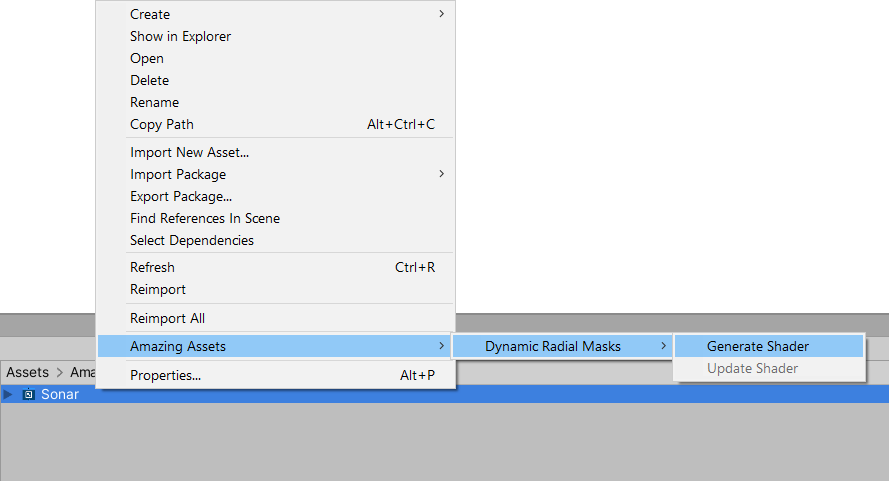
Select **Shader Graph** file containing DRM nodes inside **Project** window and from the context menu choose **Amazing Assets → Dynamic Radial Masks → Generate Shader**. This creates a new shader file that is an exact copy of the selected **Shader Graph** file, but converted into HLSL format with all DRM properties and used variables baked inside it. Use this shader instead of **Shader Graph** file.
Keep original **Shader Graph** file in the case of modifications are needed, and re-generate HLSL file after that.
For **Amplify Shader** files use the same context menu but use **Update Shader** option. This will modify selected **ASE** file instead of generating new file, however, modifying the **ASE** shader inside editor window still will be possible. Re-update file after modifying it.